

Since last month the dev team have been hyper-focused on releasing the mobile app UI improvements that we started in October last year. We announced the changes to all customers last month, alongside a video explaining the differences – and similarities – to the old style. We started pushing out releases to individual customers when we have needed to get other fixes to engineers, and are now in a position where we can roll it out to everyone. During the last sprint we created new builds for all configurations, and ran through extensive testing to make sure that all the new-look screens behave correctly, and that engineers will be able to smoothly transition from the old style to the new. This new version is now available to be pushed out to all customers over the next few weeks.
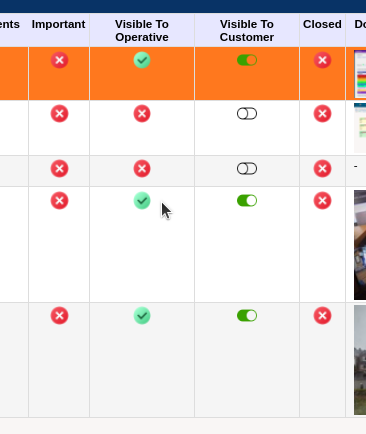
Alongside this big change we have also been working through the usual spread of customer requests – from new dashboard widgets, to tweaks for existing functionality to make life easier. One such change is a new toggle feature on the attachments report so you can easily change the visibility of the attachments. This means that you can quickly work down the list of all attachments rather than having to go into each one separately.
The new dashboard widget this release is Jobs at Approved for Charging – this shows a breakdown of the jobs that can be invoiced so you can prioritise your most important contracts. This is a flexible report to allow you to breakdown by a number of different aspects of the job – originally the contractor that requested it just wanted to be able to see their contracts, but we thought it would also be useful to allow anyone to choose a combination of contract, customer, trade, costcode etc. This widget allows you to quickly see where cash is blocked, and easily generate a batch of invoices.

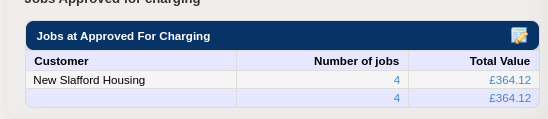
You can personalise this into your dashboard, it is the last entry at the bottom of the list.
New Features
- “Visible to client” can now be toggled directly from the jobsheet so you can quickly update which attachments you want the client to see
- New dashboard widget showing jobs at status “ready to charge” broken down by contract
- Added the ability to clone a job to the job sheet – this is controlled by a system option that will need turning on if you need this
- Transfer “before” photos with the Penetration when moving tasks between fire safety jobs
- Manual Allocation Notes are now shown when issuing to subcontractor and can be emailed out on the PO
- The first visit fix report can now be broken down by month and year
- Changes to bulk editing jobs to allow costcode changes even when using different contracts
- Added the latest sales taxpoint date as a column on the job site report
- Added creating and editing suppliers to the audit report
- Added a system option to control whether we display warnings when users skip charging for jobs with costs already associated to the job
- Changes to how easily the support team can access the “suspend user” options without accessing other user permissions
- Improvements to the new colour scheme to highlight the selected option in a live search list
- Change the survey entry screen to enable PDF layout to be selected, and default to STANDARD
- Added job category to the items requiring action report and find job
- Added client and contract details to the purchase invoice passing screen
Changes For A Single Contractor
- Convert the PDF timesheet report to a normal embedded system report to allow for additional querying
- Enhanced the Service Channel job importer to support a 2nd client: ASDA -v- On The Move
Platform Improvements
- Added FB4 support to experimental virtual servers for testing
Bug Fixes
- Project job entry now correctly reflects the project costcode changes to existing jobs
- Fixed the pass invoice screen having trouble with the thousands separator in large numbers
- Tweaked the recent letter substitution for impending appointments to force the sequence to show the next date
- Ensured that the edit and reverse survey buttons are not available on incompatible surveys or without the right permissions
- Fixed a bug with mismatched columns on absence and holiday reports
- Fixed a bug displaying duplicate entries on the items requiring action breakdown report where multiple similar statuses exist in the workflow for non-job items
- It is now possible to clear personalised radio filters on reports
- Multiple small fixes to acknowledging and generating engineer messages
- Correctly pass the section filter through when batch printing surveys
- Fixed mobile app survey items auto-scrolling to the next unanswered question
- Fixed purchase invoice auto-passing percentage for purchase orders with multiple invoices
- Correctly pass the costcode filter through to the detail report when clicking through the numbers from the dashboard live jobs widget
- Correctly pass the costcode filter through to the job cost detail report from the job cost summary report

