

Did you know that MARKUS can help you with both CIS and DRC? Chris did a webinar about this a while back, and in this article Bob explains more about the ways MARKUS can ease the process.
Are you struggling to understand CIS? Has your accounting system made it easy to track? When HMRC introduced CIS to deal with perceived tax evasion within the construction industry, we upgraded MARKUS to make the transition easier for all system users.
As you know, CIS means that payments made between contractors and subcontractors MUST consider the subcontractor’s TAX status as determined by HMRC. The rules of CIS mean the contractor might need to make a deduction in payment to a subcontractor for any expenses incurred that were not for materials or tool hire, and that the amount deducted then needs to be paid directly to HMRC.
MARKUS can calculate these deductions automatically during the normal purchase order entry process. It just requires a little setup first. MARKUS will equally export CIS deductions straight into your current accounts systems and add them to any sales invoices that need them, assuming your company is registered and deemed to be a subcontractor for that job.
CIS in MARKUS is controlled using nominal codes. Parts and Sors can have a chosen nominal code added to them during their setup process
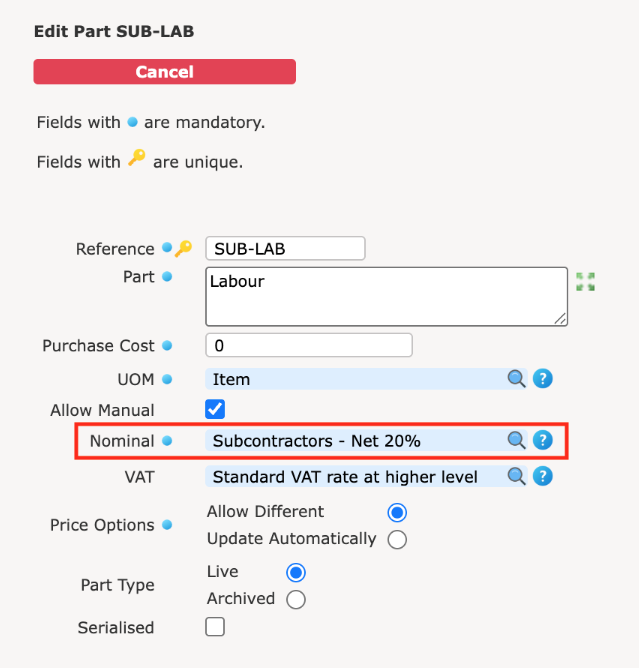

The codes will then be clearly visible on each line when you raise purchase orders, and can also be seen on job sale lines.
When you issue a job to a subcontractor in MARKUS, a purchase order is automatically created to go with the job. With the correct system options switched on, the totals section on the Purchase order will automatically show calculated CIS deductions.
For example, in the purchase order below, it shows £100 labour charge and £50 materials charge

The materials charge total remains the same, a deduction appears on the invoice concerning the labour charge. This deducted amount is based on the line’s nominal code. It’s automatically calculated when you click record invoice. There is no thinking required from the system user, MARKUS just does it for them.

Another place where MARKUS can help you calculate CIS deductions is on your Sales Invoices. Assuming you’ve registered for CIS with HMRC, should you do a job as a subcontractor for another contractor, then the lines on that job’s invoice will show CIS deductions if they are appropriate.
For example, the job below has £100 labour costs and £50 materials costs. Circled in red you can see the CIS deduction on the invoice. MARKUS calculated this automatically because the labour line is set up with a 20% CIS nominal code on it.

So as you can see MARKUS has you covered when it comes to handling CIS. Why not give us a call and ask us to set your system’s nominal codes up? Then all you need to do is add them to your parts and sors and watch the magic happen.
Domestic Reverse Charge (DRC)
Similar to CIS, we have also added to MARKUS everything you need to handle DRC smoothly and without effort. DRC came into effect on 1st March 2021 to reduce VAT fraud in the construction industry. It only applies to transactions between VAT-registered businesses that provide services covered by the CIS scheme. Services supplied to end-users such as home-owners, Housing Associations, schools and so on, are excluded. DRC only affects specific services in the construction industry. It’s also important to remember that if any part of an invoice is for works covered by DRC then the whole invoice total will get DRC applied to it.
DRC on sales
MARKUS can be set to automatically provide sales invoices that show the correct deduction calculations, along with the correct HMRC-predefined words necessary for DRC.
With the DRC system option switched on, you’ll see an extra drop-down list in the client wizard that lets you set up how DRC and VAT will behave for that client. However, don’t forget, invoice charge addresses are not always based on the client’s address in MARKUS. Invoice charge addresses can come from a client branch, a contract, a site or even be determined on an individual job basis.
There are three setup options for DRC in MARKUS
- VAT applies because they are an end user
- Zero VAT because they are not an end user
- Normal VAT rules apply (This option ignores DRC and doesn’t mention it at all on any orders or invoices because the service or goods are not covered by the CIS scheme)
The most common way to set this up is at the client level, which you can do using the client wizard. With the correct system option switched on, a new drop-down box appears on the client wizard at the client level, which lets you pick one of the three options mentioned above. This will control the wording shown on invoices and how the calculations are applied. The option is easy to set up at the client level;

The example below shows how an invoice could look with the CIS option off ‘Reverse Charge Applies – Zero VAT’

Alternatively, with the CIS options of ‘Reverse Charge Vat Does Not Apply – Normal Vat’, the invoice shows these values and the following words, where your customer is the end user and therefore is being charged VAT.

The final setting for the CIS option ‘CIS Does Not Apply’ removes the wording and shows normal VAT.

DRC and purchasing
MARKUS can calculate the correct amounts for purchase invoice entries and exports. The DRC options can be applied directly to the suppliers in MARKUS. There is the ability to set up a default DRC option that will automatically be used when you create a new supplier. Should specific suppliers require a different setting, this can be set simply by editing that particular one.
Where suppliers have been set to subcontractors, you can choose from the following options
- Reverse Charge Applied – Zero VAT
- CIS does not apply
For normal suppliers, there is only the following option because supplying a product isn’t covered by CIS
- Reverse Charge VAT does not apply – Normal VAT
In MARKUS purchase orders can be created or edited to show the correct DRC options. It’s as easy as picking from a drop down list.

Recording a purchase order invoice calculates the DRC deductions for you, based on purchase orders contents. The following example shows this in action

Here the ‘Reverse charge applies – Zero Vat’ setting switched on. We have delivered a 1 x SUB-LAB line, which has the CIS nominal code set against it. This means the DRC will then be applied to the invoice total.
If this option is switched to CIS does not apply, it would look like this; it is showing a rounding issue because now you would need to add some VAT to make it balance.

If you’re interested in setting up CIS or DRC, please call us so we can walk you through the process. 0161 477 2343.
For a recording of the webinar that covered both CIS & DRC within MARKUS head over to our videos page or our YouTube Channel. The direct link can be found here WEBINAR 2: CIS & DRC
If you’d like to find out about future online training session keep an eye on our LinkedIn page.
+and+the+Domestic+Reverse+Charge+(DRC))
+and+the+Domestic+Reverse+Charge+(DRC)&description=&image=https://www.epixsystems.co.uk/wp-content/uploads/2025/06/open-day-chris-1024x892.jpg)