

Rohan explains more…
Proximity stars have been a feature in MARKUS for many years – and recently we have been hearing about how much of an impact they have in deciding how to assign jobs to operatives. To show you just how useful they can be we’re making proximity stars the focus of this month’s Feature Focus.
Proximity stars are a fully configurable representation of the distance from an operative to the job you would like to assign them to, on a scale of one to five.
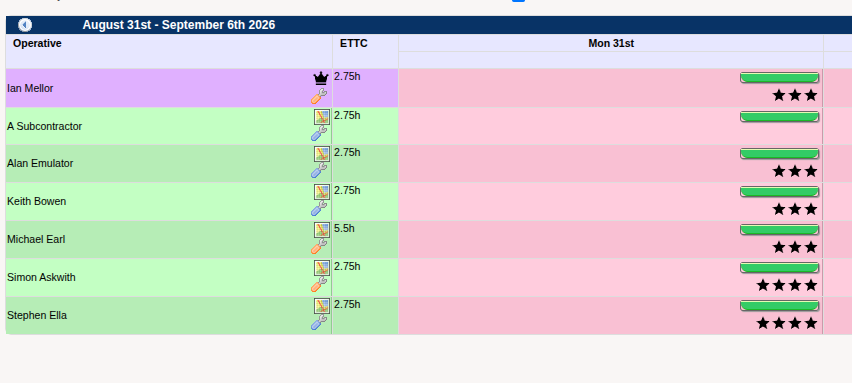
Take the above job, for example. All of the operatives are available and match the required skill set and region for the job. So how should we decide who to give the job to? To help solve this problem, we have the star-based proximity guide.
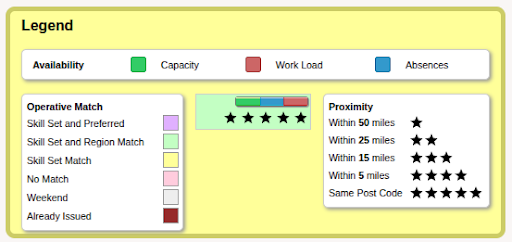
Within the legend just below the operative table, you can see the distance that each star value relates to. These values can be easily customised by giving us a call and letting us know what distances you would like in each category!
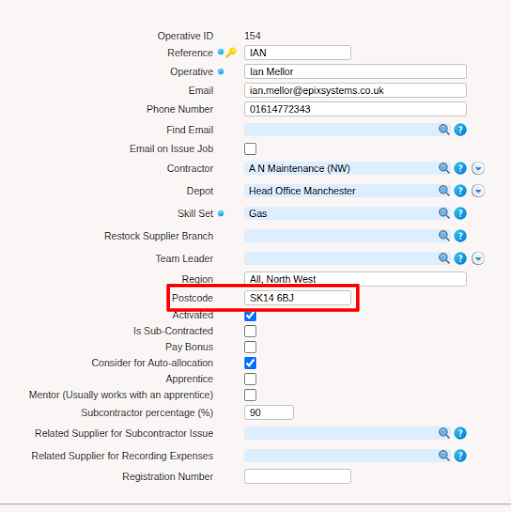
As the stars work based on location, each operative has to have a location assigned to them. This can be done very quickly by putting the postcode into the postcode box on the operative’s setup page. Once this is done, the stars will begin to show up on the issue job page!
We hope that this refresher has shown you something new about the system that you can implement into your workflow, and we hope you get as much use out of it as others have! If you have any questions at all, don’t hesitate to reach out to us!
Read the last three Feature Focus articles here ⬇️

